Standing in a crowded foreign airport holding your phone out on speakerphone while trying to decipher a flight change is an absolute nightmare.
Google knows this, which is why it is pushing out a couple of practical updates to Google Translate that fix the awkward physical friction of real-time audio translation.
According to an official company blog post by Google Product Manager Sasha Kapur, live audio translations across its 70-plus supported languages are getting significantly less clunky on both iOS and Android.
The biggest operational shift addresses how long people actually use the tool. It turns out that more than a third of live translation sessions now stretch past the five-minute mark, which used to mean staring blankly at an illuminated screen while battery life drained away.
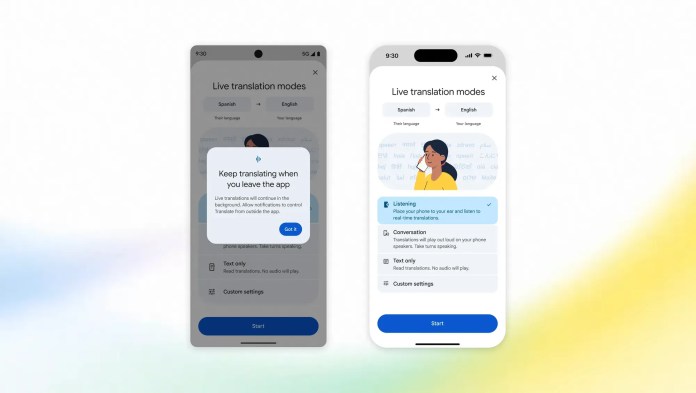
Android users are getting the first crack at background playback. You can now leave live translation running while swapping over to check your email, taking notes, or locking your device entirely to slide it back into your pocket.
iOS support for background listening is supposedly coming down the line, but Android owners get to test the waters first.
Meanwhile, iOS users get a feature Android owners have enjoyed for a while: earpiece routing. Instead of blasting translated audio through the main bottom speaker or scrambling around in a backpack to find lost Bluetooth earbuds, you can simply lift your iPhone right up to your ear like a traditional phone call.
It is a dead-simple physical interaction that makes sense for noisy tour buses, busy train terminals, or quiet museums where speakerphone audio is social suicide.




To recap the key functional changes hitting mobile devices:
- Background Execution (Android): Audio keeps rendering when switching apps or locking screens; coming to iOS later.
- Earpiece Mode (iOS): Audio routes directly through the internal call receiver for discrete listening without headphones.
- Language Scale: Live Translate currently supports over 70 languages globally in near-real time.
These tweaks might sound incremental on paper, but in actual practice, eliminating small friction points is what turns a novelty app into something you rely on daily.
You can read the full product update over on Google’s official blog to see how the rollout impacts your device.